Mantra Bio-HHT Handheld Device: A Practical Buying Guide for India
Bio-HHT pairs STQC fingerprint capture, BOSS Linux security and 4-hour battery in 500g for field Aadhaar checks. PDS, rural banking and patrol checklist.
Quick answer
the Bio-HHT pairs an STQC-certified fingerprint sensor with BOSS OS on Debian Linux, a 4x4 alphanumeric keypad, LCD with 6H toughened glass, 500-gram rugged body, 512MB RAM plus 16GB storage, 4-plus-hour battery, USB Type-C plus Bluetooth with optional Wi-Fi or 4G, and 1W speaker prompts. MegaMind supplies and supports it pan-India with AMC.

Key takeaways
- Bio-HHT pairs STQC fingerprint capture, BOSS Linux security and 4-hour battery in 500g for field Aadhaar checks. PDS, rural banking and patrol checklist.
- Why Field Verification Fails at the Device Step
- What the Bio-HHT Actually Is
- Four Questions to Answer Before You Buy
- How One Field Day Runs on It
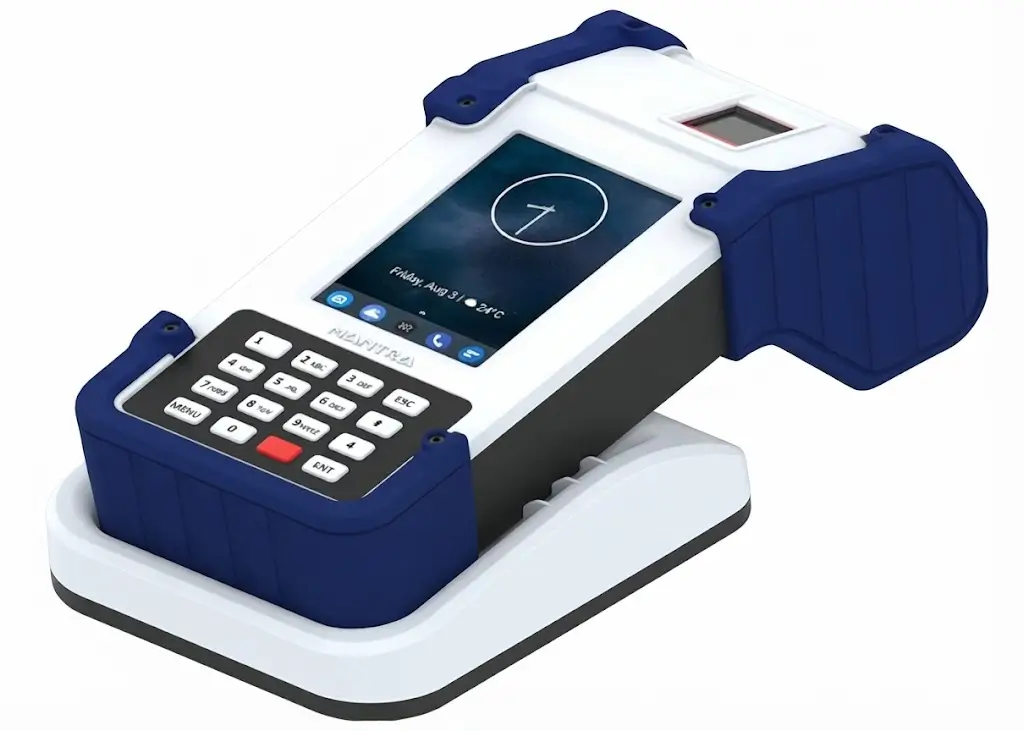
The Mantra Bio-HHT is a rugged handheld biometric device for field Aadhaar verification in India: STQC fingerprint capture, BOSS Linux security and 4-hour battery in a 500-gram body. A PDS inspector walks a village lane with the device in hand, verifies beneficiaries at their doorsteps, and finishes the route before lunch.
That gap between a terminal that authenticates at an office and one that verifies in the field is exactly what this guide tests. The Mantra Bio-HHT suits PDS routes, rural banking, mobile police checks and survey teams. This guide explains handheld logic, who must buy portable, how field day runs, and the mistakes that waste the spend.
Why Field Verification Fails at the Device Step
Ask any program head who has watched doorstep verification collapse and you hear the same story. The office terminals worked beautifully, but field teams carried consumer phones that died by noon, lost signal in lanes, and failed on worn thumbs. The program took the blame for a portability failure.
Field failure is about power plus platform plus grip, not matching algorithms. Four gates decide handheld success: certified capture for scheme acceptance, an approved OS for compliance, battery sized to route length, and a body that survives drops plus dust. This guide follows that order, with the Bio-HHT's verified numbers written down.
What the Bio-HHT Actually Is
Strip the brochure and you get a pocket office for identity: STQC fingerprint capture under 2 seconds, a 4x4 keypad for IDs and amounts, BOSS Linux running the verification app, and speaker prompts that talk operators through each step. Teams verify, log attendance and collect survey data where subjects live instead of summoning them to offices.
Compliance is the procurement gate. STQC certification plus BOSS OS clears government field programs where consumer handhelds fail security evaluation. The Mantra brand page carries the positioning, the Aadhaar range shows wall-mounted siblings, and the official Mantra site lists the current lineup and support downloads. Everything below tests those claims against real routes.
Four Questions to Answer Before You Buy
- Do subjects come to you or you go to them: doorsteps and lanes need handhelds, gates need wall terminals?
- Does your program mandate approved platforms: BOSS Linux clears where consumer Android stalls?
- How long are field routes: 4-hour battery means two devices or midday charging for full days?
- What networks cover routes: Bluetooth pairing, optional Wi-Fi or 4G, or offline buffering your app must prove?
The Parts That Decide the Purchase
The Mantra Bio-HHT earns its place on field routes through four working parts: certified capture, BOSS Linux, route-sized battery and rugged portability. Each one below carries a verified number plus a field habit that protects it.
1. STQC-Certified Fingerprint Capture
An STQC-certified fingerprint sensor keeps field captures acceptable to Aadhaar-linked schemes, with recognition under 2 seconds per subject. Doorstep queues move at walking pace instead of stalling at every second thumb. Teams carry one verification kit per operator with a spare battery bank for full-day routes.
Thumb prep travels with the team. A damp cloth plus the forehead-oil trick lifts match rates on farm-worn prints more than any settings change. For counter-grade desktop capture, the MFS100 guide covers the office sibling.
2. BOSS OS on Debian Linux
BOSS, India's government-approved Debian Linux, runs the verification stack on a compliant platform instead of a consumer build with unknown update behaviour. Programs that mandate approved OS layers clear evaluation where Android handhelds stall.
Platform lock-in needs planning. Confirm your exact app build runs on the shipped BOSS version before ordering fleets, because field re-flashing across districts costs weeks. Freeze one OS plus app combination per program phase.
3. 4-Hour Battery and Route Maths
Over 4 hours of continuous use sets the route equation: one Bio-HHT covers a half-day route, while full field days need two devices per team or a midday charging halt with power banks. The 500-gram body keeps all-day carry practical across lanes and stairs.
Charging discipline decides afternoons. Teams that top up at lunch finish routes, while teams that assume full-day endurance stall at 3 pm. Issue one power bank per device and mandate the lunch plug-in as route SOP.
4. Keypad, Speaker and Rugged Grip
A 4x4 alphanumeric keypad enters IDs and amounts without touchscreen hunting, the 1W speaker announces each step over lane noise, and 6H toughened glass plus a ruggedised 500-gram enclosure survives drops that kill phones. USB Type-C plus Bluetooth with optional Wi-Fi or 4G connects however the route allows. For fixed office attendance, the MBAS30 guide covers the wall sibling.
Grip accessories decide drop rates. Wrist straps plus belt holsters cost little and save screens daily, while bare carry guarantees the first-week crack. Add straps and cases to every kit quotation, not as afterthoughts.
How One Field Day Runs on It
Morning starts with charge plus sync: devices leave base at 100 percent, apps synced, test verification on your own thumb passed. Teams that skip the test discover dead apps three lanes away instead.
Through the route, operators follow verify, announce, log rhythm. Worn prints get prep plus repositioned retries, network gaps get queued per app behaviour, and supervisors track verified counts against route lists hourly. At midday, devices top up over lunch while teams eat. At return, counts reconcile, devices dock to charge, and the day's exceptions get documented before dinner.
Weekly, clean sensors with dry cloths and audit strap plus case condition because field wear compounds. Monthly, compare verification rates across teams: a falling team with steady routes points to sensor dirt or skipped prep, while all teams falling together points to server or app changes upstream.
Who Gains the Most From It
PDS Inspectors and Ration Delivery
Doorstep beneficiary verification needs portable certified capture with audio prompts for elderly users. The Bio-HHT's keypad plus speaker suits lane work where wall terminals never reach. For queue planning alongside, see how to choose an attendance machine.
Rural Banking and Doorstep Services
BC agents and banking vans verify customers where they live, with keypad entry for amounts and accounts. Battery plus Bluetooth covers camps without wired infrastructure. For desk-based AEPS capture, the MFS100 guide covers the counter sibling.
Police Checkpoints and Survey Teams
Mobile ID checks, census lanes and remote attendance logging need rugged portability with compliant platforms. BOSS Linux plus 500-gram grip suits patrol and survey duty. For enrolment-grade desktop capture, the MFS500 guide covers the office sibling.
Bio-HHT Against the Alternatives
| Option | What you get | Where it falls short | Best fit |
|---|---|---|---|
| Bio-HHT handheld | STQC capture, BOSS Linux, keypad, 4-hr battery | Half-day battery, small screen | Doorsteps, lanes, checkpoints |
| Consumer phone plus scanner | Familiar, cheap, camera-rich | Dies by noon, unapproved OS, fragile | Pilot demos only |
| Wall AEBAS terminal | Certified, triple mode, always powered | Fixed place, subjects must travel | Offices, gates, stations |
| Laptop plus desktop scanner | Full apps, big screen | Needs table plus power, heavy bag | Camps with vehicles |
Buy the Mantra Bio-HHT where verifiers walk to subjects across lanes and routes. Stay wall-mounted where subjects queue at gates, and laptop-based where vehicles carry tables. I would not send phone-plus-scanner kits to a district-wide PDS route, because noon battery deaths will retire them within a week.
Bio-HHT Price in India
Pricing is quote-based and moves with stock, warranty terms and quantity. Three numbers decide the real kit cost: handheld price with sealed-box warranty, accessories per kit with straps plus cases plus power banks, and spares at one per five devices for drops and battery aging.
Handheld programs live on accessories. Teams that price devices alone discover straps, cases and power banks later at retail urgency. Confirm full kit contents plus spares ratio in writing before comparing quotes.
How Long One Bio-HHT Survives Field Duty
Field life is drops plus battery cycles, not years on a sticker. Lane teams verify a hundred doorsteps daily with concrete underfoot, which means straps plus cases decide screen survival while lunch charging decides route completion. Teams that holster every device and top up at midday run for years.
Plan replacements around wear in order: power banks yearly as cells age, straps plus cases per season, and the handheld itself for the program's life when both hold. A district with twenty teams should hold four spare devices, because a cracked screen far from base ends that route's day.
Deployment in Seven Steps
- Confirm the program mandates plus platform: STQC capture and BOSS OS matched in writing.
- Map route lengths against 4-hour battery and decide device count plus power banks per team.
- Kit every device with strap, holster, case, cloth, charger and power bank before day one.
- Freeze one BOSS plus app build and test your exact verification flow on it.
- Train thumb prep, keypad entry and speaker-led flow on real lanes, not classrooms.
- Test offline buffering explicitly if routes cross dead zones, with sync verification after.
- Reconcile verified counts daily and audit battery health monthly, because aging cells shrink routes.
Mistakes That Waste the Spend
Assuming full-day battery. Four hours means half-day routes per device. Plan pairs or lunch charging, or lose afternoons.
Skipping offline tests. Dead-zone routes without proven buffering lose verifications silently. Test store-and-forward before deployment, not after complaints.
Issuing bare devices. Straps and cases cost little, screens cost much. Every uncased handheld meets concrete within weeks.
Mixing app builds across teams. Unreproducible field bugs follow mixed versions. One frozen build per phase, everywhere. Book a site survey for district rollouts, let the installation team configure fleets, and keep AMC cover for year-two continuity.
How Many Handhelds One Program Needs
Throughput is teams times route hours, not headcount. One two-person team on half-day routes needs one Mantra Bio-HHT device, while full-day routes need two plus a power bank. A district with twenty teams fields twenty to forty devices with spares at one per five for drops and battery swaps.
Run the maths for peak distribution weeks plus monsoon delays, not quiet months. Programs sized for averages stall when every beneficiary arrives together. Spares keep lanes moving when screens crack far from base.
How to Read the Quotation
Compare quotes on the full kit stack: sealed Bio-HHT devices with serials, straps plus holsters plus cases, chargers plus power banks, app plus BOSS compatibility confirmation, manufacturer warranty terms, dispatch timelines across districts, training scope and AMC from year two. Fleet rollouts need per-team kit scope, not device-only sums.
Ask for a live lane trial on your own routes with worn-thumb subjects before the order, then request a quote through Get a Quote with team count, route hours and program references written down.
Bottom Line
Field success rests on four legs: certified capture, compliant platform, route-sized power and kitted ruggedness. The Mantra Bio-HHT brings proven handheld hardware for all four across India's lanes and checkpoints, but only route discipline makes them stand together. Confirm platform in writing, size batteries to routes, kit every device, and buy sealed.
Tell us your team count, route hours and program references for a kit plus support quote from verified specs. The Bio-HHT product page carries the full specification to share with your procurement committee.
Want the short version of every guide like this?
Get practical buying tips, product comparisons and security advice — plus a free consultation when you're ready to compare options.
Related Products — Mantra Bio-HHT Handheld Device: A Practical Buying Guide for
Bio-HHT Handheld Device
Mantra Bio-HHT — rugged handheld biometric authentication device with STQC-certified fingerprint sensor, BOSS OS (Debian Linux), 4×4 keypad and 4-hour battery for field Aadhaar verification.
- AuthFingerprint
- USB

Mantra MFS100 — India's benchmark STQC-certified (L0) optical fingerprint scanner with 500 DPI scratch-resistant sensor, fast USB 2.0 connectivity and multi-platform driver support for banking, eKYC, and citizen welfare schemes.
- Fingerprint Capacity1
- AuthFingerprint
- USB