Mantra BioNIC V7 Fingerprint plus Card: A Practical Buying Guide fo…
BioNIC V7 pairs STQC L1 fingerprint capture with MIFARE DESFire card reading for two-factor access. Desk, kiosk and reception checklist.
Quick answer
the BioNIC V7 pairs a 500 DPI optical sensor (16 by 18 mm area, 316 by 356 pixels) with ISO 19794-2 plus 19794-4 templates, NIST quality scoring, STQC L1 certification, ISO 14443 Type A plus B card reading with MIFARE Classic plus DESFire, sub-2-second acquisition, USB 2.0 and CE plus FCC certification. MegaMind supplies, installs and supports it pan-India with AMC.

Key takeaways
- BioNIC V7 pairs STQC L1 fingerprint capture with MIFARE DESFire card reading for two-factor access. Desk, kiosk and reception checklist.
- Why Single-Credential Doors Fail
- What the BioNIC V7 Actually Is
- Four Questions to Answer Before You Buy
- How One Desk Day Runs on It
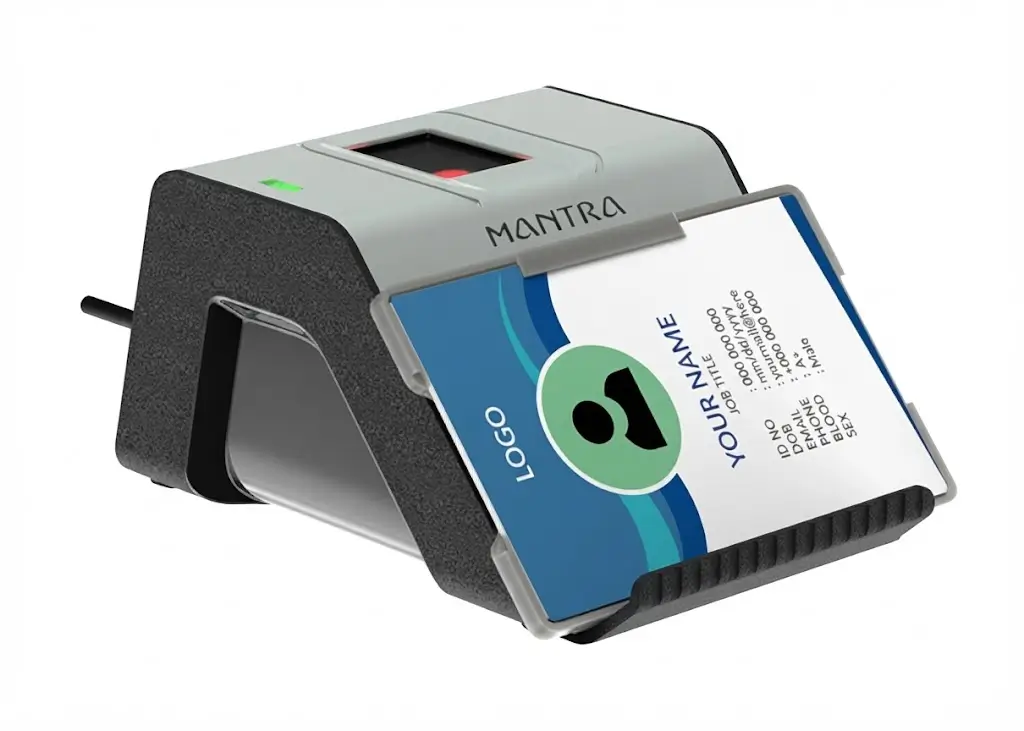
The Mantra BioNIC V7 is a dual fingerprint plus smart-card reader for two-factor access in India: STQC L1 500 DPI capture with MIFARE DESFire card reading over USB 2.0. A corporate tower in Gurgaon watches a borrowed ID card open the lobby, and the two-factor rule that follows puts fingerprint plus card readers on every desk.
That gap between a reader that identifies and one that verifies is exactly what this guide tests. The Mantra BioNIC V7 suits receptions, kiosks and access desks where borrowed cards must fail. This guide explains two-factor logic, who must buy dual readers, how desk day runs, and the mistakes that waste the spend.
Why Single-Credential Doors Fail
Ask any security officer who has audited access logs and you hear the same story. Cards were shared, PINs were watched, and the log showed the right credential with the wrong person behind it. The door took the blame for a factor failure.
Single-factor failure is about proof, not hardware. Four gates decide access truth: something held plus something embodied, card technology that resists cloning, biometric quality that survives daily thumbs, and software that logs both factors together. This guide follows that order, with the V7's verified numbers written down.
What the BioNIC V7 Actually Is
Strip the brochure and you get a desk appliance for proof: tap the MIFARE card to claim identity in a second, place the finger to prove it under 2 seconds more, and ISO templates plus card IDs reach your access software over USB. Reception staff enrol visitors in minutes while employees tap through in seconds.
Certification keeps it deployable. STQC L1 plus CE plus FCC clears enterprise, banking and government desks where uncertified readers fail procurement. The Mantra brand page carries the positioning, the fingerprint range shows capture-only siblings, and the official Mantra site lists the current lineup and support downloads. Everything below tests those claims against real desks.
Four Questions to Answer Before You Buy
- Does this door need proof or just identity: visitors plus staff areas need two factors, store rooms may not?
- What cards already circulate: MIFARE Classic, DESFire, or legacy tokens the reader must prove itself on?
- What hosts the reader: reception PCs, kiosk builds, or attendance software needing ISO templates?
- Who enrols cards plus fingers: reception workflow, HR onboarding, or a self-service kiosk flow?
The Parts That Decide the Purchase
The Mantra BioNIC V7 earns its desk space through four working parts: L1 fingerprint capture, DESFire card reading, two-factor workflow and USB software fit. Each one below carries a verified number plus a desk habit that protects it.
1. STQC L1 Fingerprint Capture With NIST Scoring
Capture runs at 500 DPI over 16 by 18 mm, producing 316 by 356 pixel images, with NIST quality scoring rejecting weak captures while the finger still rests on the platen. STQC L1 certification keeps government desks compliant. Output follows ISO 19794-2 plus 19794-4 for access platforms. Enrol two fingers per user on day one so cuts never block entry.
Quality gating changes enrolment. Staff enrolled cleanly on day one verify for years, while rushed enrolments fail every Monday. Spend two minutes per finger at onboarding and save two hours of helpdesk monthly.
2. MIFARE Classic Plus DESFire Card Reading
ISO 14443 Type A plus B support with MIFARE Classic plus DESFire covers modern card stocks, where DESFire's cryptography resists the cloning that defeats legacy tokens. Cards identify in a tap while fingerprints prove in a touch.
Card stock decides migration. Sites on legacy tokens should trial the V7 against their exact cards before ordering, then plan a DESFire migration where cloning risk matters. For pure Aadhaar capture desks, the MFS110 guide covers the sibling option.
3. Two-Factor Workflow at Reception Speed
Tap-plus-touch completes in seconds: card claims identity instantly, fingerprint proves it in under 2 seconds, and the door or attendance record follows. Throughput suits reception peaks where visitors plus staff arrive together.
Workflow order decides queues. Card first then finger beats finger-first because card lookup narrows the match to one template. Configure your software for card-gated matching before blaming readers for speed.
4. USB Fit for Desks and Kiosks
USB 2.0 plug-and-play suits reception PCs and kiosk builds without network rewiring, and CE plus FCC certification eases enterprise procurement. Compact desk-mount form keeps crowded counters workable. For counter-grade Aadhaar capture, the MFS100 guide covers the desk sibling.
Driver discipline decides mornings. Install on the exact USB port the reader will live on, label it, and recheck after OS updates. Kiosk builders should freeze one OS plus driver build per release.
How One Desk Day Runs on It
Morning starts with a self-test: tap your own card, touch your own finger, watch both factors log green. Desks that skip this discover dead USB enumeration at visitor peak instead.
Through the day, employees tap through in seconds while reception enrols visitors with card issuance plus two-finger capture. Failed touches get repositioned retries, then the second enrolled finger before any override. At closing, the reader gets wiped, visitor cards get collected, and logs reconcile against the visitor register.
Weekly, clean platens and audit unreturned visitor cards because card piles grow silently. Monthly, compare failure rates across desks: one desk failing more points to dirt or a dying cable, while all desks failing together points to software or server changes.
Who Gains the Most From It
Corporate Receptions and Towers
Borrowed cards die at the second factor while throughput stays reception-fast. Tap-plus-touch suits lobbies where image matters as much as security. For queue planning alongside, see how to choose an attendance machine.
Banks, Hospitals and Government Desks
Customer authentication, staff identification and eKYC counters need audit-grade proof in minutes. STQC L1 plus ISO templates fit these stacks directly. For enrolment-grade capture, the MFS500 guide covers the desk sibling.
Kiosk Builders and Integrators
Time-attendance kiosks and secure entry points embed dual readers for card plus biometric flows. USB fit plus SDK-style integration suits product builds. For slim capacitive embeds, the MARC11 guide covers the module sibling.
BioNIC V7 Against the Alternatives
| Option | What you get | Where it falls short | Best fit |
|---|---|---|---|
| BioNIC V7 reader | L1 fingerprint plus DESFire card, USB desk fit | Desk-bound, needs host PC | Receptions, kiosks, access desks |
| MFS110 scanner | L1 capture, SDK, compact | No card reading, single factor | Aadhaar eKYC counters |
| Card-only reader | Fast taps, cheap cards | Borrowed cards open doors | Low-risk internal doors |
| Fingerprint-only reader | Biometric proof, no cards | No card-gated speed, card workflows missing | Small offices, no card stock |
Buy the Mantra BioNIC V7 where doors need proof plus speed at desks and kiosks. Stay capture-only where Aadhaar alone is the job, and card-only where risk stays low. I would not guard a data-centre door with card taps alone, because borrowed plastic proves nothing about the hands holding it.
BioNIC V7 Price in India
Pricing is quote-based and moves with stock, warranty terms and quantity. Three numbers decide the real cost: reader price with sealed-box warranty, card stock plus printing across headcount, and software licences for two-factor logging.
Dual readers replace two devices with one. Desks that price fingerprint plus card readers separately discover the V7 costs less than the pair while logging both factors together. Confirm card compatibility plus software scope in writing before comparing quotes.
How Long One V7 Guards a Desk
Desk life is enrolment quality plus card hygiene, not years on a sticker. A corporate lobby crosses three hundred tap-plus-touch events daily, which means two-finger enrolment decides helpdesk load while daily card collection decides key control. Desks that enrol twice and collect nightly run for years.
Plan audits around two piles: unreturned visitor cards weekly, and failure-rate drift monthly. One collection ritual plus one log review beats one anonymous-key incident every time.
Deployment in Seven Steps
- Confirm the door risk plus workflow: two-factor where proof matters, single factor where it does not.
- Trial the V7 against your exact card stock, including oldest issued batches.
- Enrol staff with two fingers each plus card issuance in one onboarding pass.
- Configure software for card-gated matching: card first, then finger, then door.
- Install readers on labelled USB ports and verify enumeration after OS updates.
- Collect visitor cards daily and reconcile logs against the visitor register.
- Audit unreturned cards weekly and failure rates monthly, because piles plus drift compound.
Mistakes That Waste the Spend
Enrolling one finger. Cuts happen on Mondays. Two enrolled fingers keep doors opening without escort entries.
Skipping card-stock trials. Legacy tokens vary silently. Untested cards fail at rollout instead of in the demo room.
Finger-first configuration. Matching one-to-many on every touch slows queues. Card-gated matching keeps reception fast.
Ignoring visitor-card piles. Unreturned cards become anonymous keys. Daily collection plus weekly audits close the loop. Book a site survey for multi-door rollouts, let the installation team configure readers plus software, and keep AMC cover for year-two continuity.
How Many Readers One Site Needs
Throughput is doors times peak arrivals, not headcount. One reception lane with a hundred arrivals in fifteen minutes needs one Mantra BioNIC V7 reader, while three lanes need three. A campus with five access desks fields five readers plus one spare for failures and enrolment overflow.
Run the maths for visitor peaks plus audit weeks, not quiet afternoons. Sites sized for averages queue into lobbies when delegations arrive together. Spares keep doors proving identity when readers need service.
How to Read the Quotation
Compare quotes on the full stack: sealed V7 readers with serials, card stock plus printing, enrolment support, software licences for two-factor logging, OS compatibility confirmation, manufacturer warranty terms, dispatch timelines, and AMC from year two. Multi-desk rollouts need per-desk scope, not lump sums.
Ask for a live trial on your own cards plus thumbs before the order, then request a quote through Get a Quote with desk count, card volumes and software names written down.
Bottom Line
Desk success rests on four legs: proven fingerprint quality, clone-resistant cards, card-gated workflow and enrolment discipline. The Mantra BioNIC V7 brings proven dual hardware for all four at receptions, kiosks and access desks across India, but only onboarding discipline makes them stand together. Confirm card stock in trial, enrol two fingers, configure card-first, and buy sealed.
Tell us your desk count, card volumes and software names for a reader plus integration quote from verified specs. The BioNIC V7 product page carries the full specification to share with your security committee.
Want the short version of every guide like this?
Get practical buying tips, product comparisons and security advice — plus a free consultation when you're ready to compare options.
Related Products — Mantra BioNIC V7 Fingerprint plus Card: A Practical Buying
BioNIC V7
Mantra BioNIC V7 — fingerprint and smart-card reader with 500 DPI optical sensor, ISO 19794-2/4 templates, STQC L1 certification and MIFARE DESFire support for enterprise access control.
- AuthFingerprintCard
- USB

MFS110 L1 Fingerprint Scanner
Mantra MFS110 — STQC/UIDAI-certified L1 fingerprint scanner with 500 DPI optical sensor, USB interface and compact form factor for Aadhaar eKYC, banking and government services.
- AuthFingerprint
- USB