Mantra MARC11 Capacitive Scanner: A Practical Buying Guide for India
MARC11 pairs FAP10 capacitive sensing, 500 DPI capture and USB Type-C in a 58mm slim body for kiosks, POS and OEM builds. Embedding checklist inside.
Quick answer
the MARC11 pairs a FAP10 capacitive sensor (12.8 by 18 mm platen, 256 by 360 pixel 8-bit capture) with 500 DPI resolution, dry plus wet plus damaged-print handling, USB Type-C connectivity, ISO 19794-2 plus 19794-4 templates, SDK for Windows, Linux and Android, and CE plus FCC certification in a 58 by 33 by 11 mm body. MegaMind supplies sealed stock pan-India with warranty and AMC.

Key takeaways
- MARC11 pairs FAP10 capacitive sensing, 500 DPI capture and USB Type-C in a 58mm slim body for kiosks, POS and OEM builds. Embedding checklist inside.
- Why Slim Builds Fail at the Sensor Step
- What the MARC11 Actually Is
- Four Questions to Answer Before You Buy
- How One Integration Day Runs
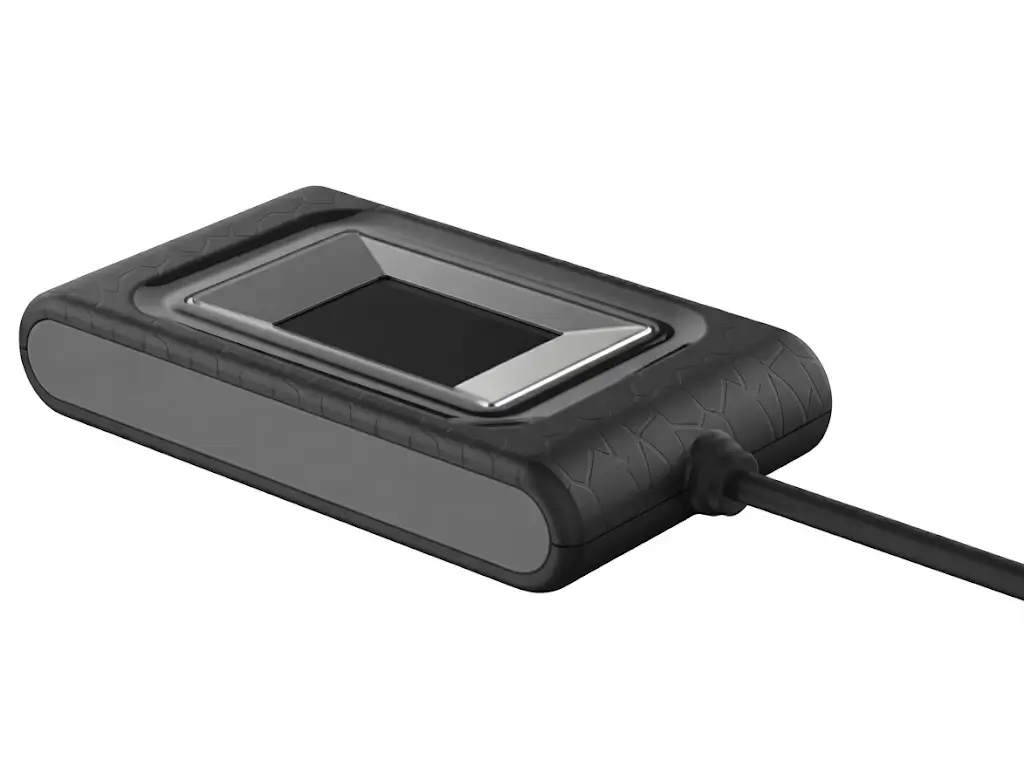
The Mantra MARC11 is an STQC-certified capacitive fingerprint scanner for slim builds in India: FAP10-grade sensing, 500 DPI capture, USB Type-C and a 5 mm OEM module option. A POS manufacturer in Noida stares at 12 mm of clearance beside the display, and a 5 mm module slides in where no optical reader ever could.
That gap between a scanner that works on a desk and one that disappears inside a product is exactly what this guide tests. The Mantra MARC11 suits kiosks, POS terminals and OEM device builds where millimetres decide. This guide explains capacitive trade-offs, who must buy slim, how integration day runs, and the mistakes that waste the spend.
Why Slim Builds Fail at the Sensor Step
Ask any OEM engineer who has re-cut enclosure tooling and you hear the same story. The scanner worked on the bench, the SDK integrated cleanly, but the housing needed 40 mm of depth the drawing never had. The project took the blame for a dimension failure.
Integration failure is about millimetres and connectors, not matching algorithms. Four gates decide embed success: module dimensions against the cavity, connector placement against the PCB, SDK support for the exact OS build, and certification for the deployment scheme. This guide follows that order, with the MARC11's verified numbers written down.
What the MARC11 Actually Is
Strip the brochure and you get a capacitive reader that measures finger ridges electrically instead of photographing them: place the finger, the FAP10-grade array senses ridge capacitance through dry, wet or damaged skin, and an ISO template reaches your kiosk or POS app over USB Type-C. No bulky optics, no deep cavity.
Certification keeps it deployable. STQC certification for Aadhaar authentication plus CE and FCC clears banking KYC, telecom activation and attendance integrations where uncertified modules die at compliance. The Mantra brand page carries the positioning, the fingerprint range shows optical siblings, and the official Mantra site lists the current lineup and SDK downloads. Everything below tests those claims against real builds.
Four Questions to Answer Before You Buy
- Does your cavity fit 11 mm depth or only 5 mm: full device or OEM module against the drawing?
- Does your scheme need STQC: Aadhaar flows demand it, private attendance may not?
- What hosts the sensor: Windows kiosk, Linux terminal, or Android POS with your exact app build?
- Who owns the enclosure change: your tooling budget or the customer's redesign cycle?
The Parts That Decide the Purchase
The Mantra MARC11 earns its place inside products through four working parts: capacitive sensing, slim dimensions, Type-C connectivity and SDK-backed integration. Each one below carries a verified number plus a build habit that protects it.
1. FAP10 Capacitive Sensing on Tough Prints
Capacitive arrays read ridge capacitance directly, so a 500 DPI sensor with 256-level greyscale captures 256 by 360 pixel images across a 12.8 by 18 mm platen, matching what authentication software expects.
Skin still sets limits. Extremely dusty construction hands need a wipe first, because dust insulates capacitance the way it clouds optics. Train kiosk UX to show a wipe-then-place animation before the error message.
2. Millimetres That Save Tooling
Device dimensions of 58.1 by 33.3 by 11 mm fit kiosk faces and POS sides, while the 35 by 23 by 5 mm OEM module disappears into handheld shells and custom enclosures. One re-cut of injection tooling costs more than a box of sensors, so dimensions decide budgets early.
Mechanical drawings settle everything. Confirm cavity depth, mounting holes, connector exit direction and cable bend radius against the module drawing before freezing tooling. A 3D-printed fit check with the real module beats ten email threads.
3. USB Type-C and Modern Hosts
USB Type-C plug-and-play suits current kiosk boards, POS terminals and Android devices without adapter chains. Recognition runs under 2 seconds, keeping queues moving at telecom counters and branch desks. For dusty AEPS counters instead, the MFS100 scanner stays the optical value pick.
Type-C orientation removes support calls. Users stop flipping connectors and breaking ports, which matters at unattended kiosks where nobody teaches insertion. Cable strain relief at the enclosure exit decides port life more than connector ratings do.
4. SDK Support Across Three Platforms
Product teams embed the MARC11 into kiosk, POS and attendance software directly through SDK support for Windows, Linux and Android with ISO 19794-2 plus 19794-4 templates. For L1-mandated Aadhaar flows, compare the MFS110 L1 scanner as the sibling option.
Version discipline across the fleet decides shipments. Freeze one SDK plus OS build per product release, test your exact app against it, and lock the combination in release notes. Mixed SDK versions across a fleet create bugs nobody can reproduce.
How One Integration Day Runs
Morning starts with mechanical checks: module seated in the printed cavity, connector mated without strain, host detecting the device on first plug. Builds that skip fit checks discover interference after tooling instead.
Through the day, firmware and app teams test in parallel. Placement guides get tuned for thumb angles, retry logic gets capped at three attempts before offering an alternate finger, and supervisors log failure thumbs for evening review. At closing, the day's fit plus match notes go into the build register with photos.
Weekly, re-run the full subject panel after every app update because UI changes break placement more often than SDK changes break matching. Monthly, compare failure rates across enclosure revisions: a rising trend with steady subjects points to mechanical shift, not sensor decay.
Who Gains the Most From It
Kiosk and POS Manufacturers
Slim-form kiosks, payment terminals and self-service machines need biometric capture without depth. The MARC11's 11 mm device and 5 mm module fit faces and sides that optical housings cannot. For queue-adjacent attendance planning, see how to choose an attendance machine.
Banks, NBFCs and Telecom Retail
Branch verification desks, loan-agent tablets and SIM activation counters need compact capture with modern connectors. USB Type-C suits current hardware refreshes, and STQC certification keeps Aadhaar flows compliant.
OEM Device Makers and Integrators
Handheld shells, access panels and custom terminals embed the OEM module with SDK support across three platforms. Compact dimensions simplify industrial design, and CE plus FCC certification eases enterprise procurement. For enrolment-grade certified capture instead, the MFS500 guide covers the optical sibling.
MARC11 Against the Alternatives
| Option | What you get | Where it falls short | Best fit |
|---|---|---|---|
| MARC11 capacitive | FAP10 sensing, 11mm slim, Type-C, OEM module | Smaller platen, needs clean contact | Kiosks, POS, OEM embeds |
| MFS100 optical | STQC L0, scratch platen, dusty-counter king | Bulky housing, USB-A era | AEPS, CSC counters |
| MFS500 optical | FBI PIV plus FAP10, NIST filtering, IP54 | Larger body, enrolment pricing | Enrolment, AFIS, border |
| Phone fingerprint | Built in, zero hardware | Small area, scheme limits, no STQC | Consumer unlock only |
Buy the Mantra MARC11 when millimetres decide the design or Type-C decides the platform. Stay optical when dust dominates or enrolment certificates dominate. I would not force a bulky optical reader into a slim kiosk face, because re-cut tooling costs more than the sensor debate ever saves.
MARC11 Price in India
Pricing is quote-based and moves with stock, warranty terms and quantity, with OEM module volumes priced per program. Three numbers decide the real cost: unit or module price with warranty, tooling cost avoided by correct dimensions, and support cost across your fleet's SDK life.
Slim hardware saves tooling budgets first. One avoided enclosure re-cut pays for hundreds of sensors, so compare module quotes against tooling quotes, not just against other scanners. Confirm mechanical drawings and SDK version with every quotation.
How Long One MARC11 Lasts Inside a Product
Embed life is port cycles plus firmware freezes, not sensor hours. Kiosk faces see thousands of touches monthly, which means strain relief at the enclosure exit decides port life while frozen SDK builds decide software life. Programs that lock one SDK per release avoid the unreproducible bugs that kill fleets.
Plan revisions around mechanical stability: locked drawings plus frozen builds run for years, while mid-life cavity changes obsolete spares overnight. Five pilot modules before tooling beat one tooling correction after launch every time.
Integration in Seven Steps
- Freeze the cavity drawing against the module dimensions: depth, holes, connector exit and bend radius.
- Print a 3D fit check with the real module before committing any tooling.
- Freeze one SDK plus OS build per product release and test your exact app against it.
- Tune placement guides and cap retries at three attempts before offering an alternate finger.
- Run a 50-subject panel across dry, wet and worn prints before pilot shipments.
- Lock strain relief at the enclosure exit so ports survive field handling.
- Log failure thumbs by enclosure revision, because mechanical shift mimics sensor decay.
Mistakes That Waste the Spend
Freezing tooling before fit checks. Drawings lie about bend radius. A printed cavity with the real module tells the truth for the price of filament.
Mixing SDK versions across fleets. Unreproducible bugs follow mixed builds. One SDK plus OS freeze per release, locked in release notes.
Skipping the subject panel. Lab thumbs never predict field thumbs. Fifty subjects across skin conditions predict launch week directly.
Ignoring strain relief. Type-C ports die from cable pulls, not insertions. Enclosure exits without relief create warranty returns. Book a site survey for kiosk rollouts, let the installation team standardise builds, and keep AMC cover for year-two continuity.
How Many Units One Program Needs
Throughput is faces times shifts, not sensors in a box. One kiosk face needs one Mantra MARC11 device, while one OEM product line needs modules per unit shipped plus 5 percent spares for warranty swaps. A 500-kiosk rollout fields 500 devices and holds 25 spares for vandalism, spills and port damage.
Run the maths for peak deployment plus warranty years, not launch month. Kiosk programs that order exact quantities stall when the first vandalised face waits weeks for a spare. Spares at 5 percent keep service promises intact.
How to Read the Quotation
Compare quotes on the full stack: sealed MARC11 devices or OEM modules with drawings, SDK version plus sample code, OS compatibility confirmation, STQC plus CE plus FCC paperwork, manufacturer warranty terms, dispatch timelines, and AMC from year two. OEM volumes need per-program pricing with revision locks.
Ask for five pilot modules plus a fit report before the order, then request a quote through Get a Quote with cavity drawings, host types and volume forecasts written down.
Bottom Line
Embed success rests on four legs: correct dimensions, matching certification, frozen SDK builds and genuine stock. The Mantra MARC11 brings proven slim hardware for all four inside kiosks, POS terminals and OEM products across India, but only drawing discipline makes them stand together. Measure the cavity, freeze the SDK, pilot on real thumbs, and buy sealed.
Tell us your cavity drawings, host mix and volume forecast for a device plus support quote from verified specs. The MARC11 product page carries the full specification to share with your design team.
Want the short version of every guide like this?
Get practical buying tips, product comparisons and security advice — plus a free consultation when you're ready to compare options.
Related Products — Mantra MARC11 Capacitive Scanner: A Practical Buying Guide for
Mantra MARC11 — ultra-slim FAP10 capacitive fingerprint scanner with 500 DPI resolution, STQC-certified, USB Type-C and OEM-embeddable module for Aadhaar and enterprise authentication.
- AuthFingerprint
- USB

Mantra MFS100 — India's benchmark STQC-certified (L0) optical fingerprint scanner with 500 DPI scratch-resistant sensor, fast USB 2.0 connectivity and multi-platform driver support for banking, eKYC, and citizen welfare schemes.
- Fingerprint Capacity1
- AuthFingerprint
- USB
Keep Reading — Mantra MARC11 Capacitive Scanner: A Practical Buying Guide for
Mantra MFS100 Fingerprint Scanner: A Practical Buying Guide for India
Sep 15, 2026 · 10 min read
Mantra MFS110 L1 Fingerprint Scanner: A Practical Buying Guide for India
Sep 16, 2026 · 9 min read
Mantra MFS500 Fingerprint Scanner: A Practical Buying Guide for India
Sep 17, 2026 · 10 min read