Mantra MFS100 Fingerprint Scanner: A Practical Buying Guide for India
MFS100 pairs STQC-certified 500 DPI optical capture, sub-second auto-capture and USB bus power for AEPS, CSC, Jeevan Pramaan and PDS counters. L0 limits, RD setup and fake-seller checks.
Quick answer
the MFS100 pairs a scratch-resistant 500 DPI optical sensor (16 by 18 mm platen, 280 by 360 pixel image) with auto finger detection, capture under one second, ISO plus ANSI templates with WSQ compression, USB 2.0 bus power at 5 volts, IP54 sensor surface, and STQC plus CE plus FCC plus RoHS plus BIS certification. MegaMind supplies sealed stock pan-India with manufacturer warranty.

Key takeaways
- MFS100 pairs STQC-certified 500 DPI optical capture, sub-second auto-capture and USB bus power for AEPS, CSC, Jeevan Pramaan and PDS counters. L0 limits, RD…
- Why Counters Fail at the Fingerprint Step
- What the MFS100 Actually Is
- Four Questions to Answer Before You Buy
- How One Counter Day Runs on It
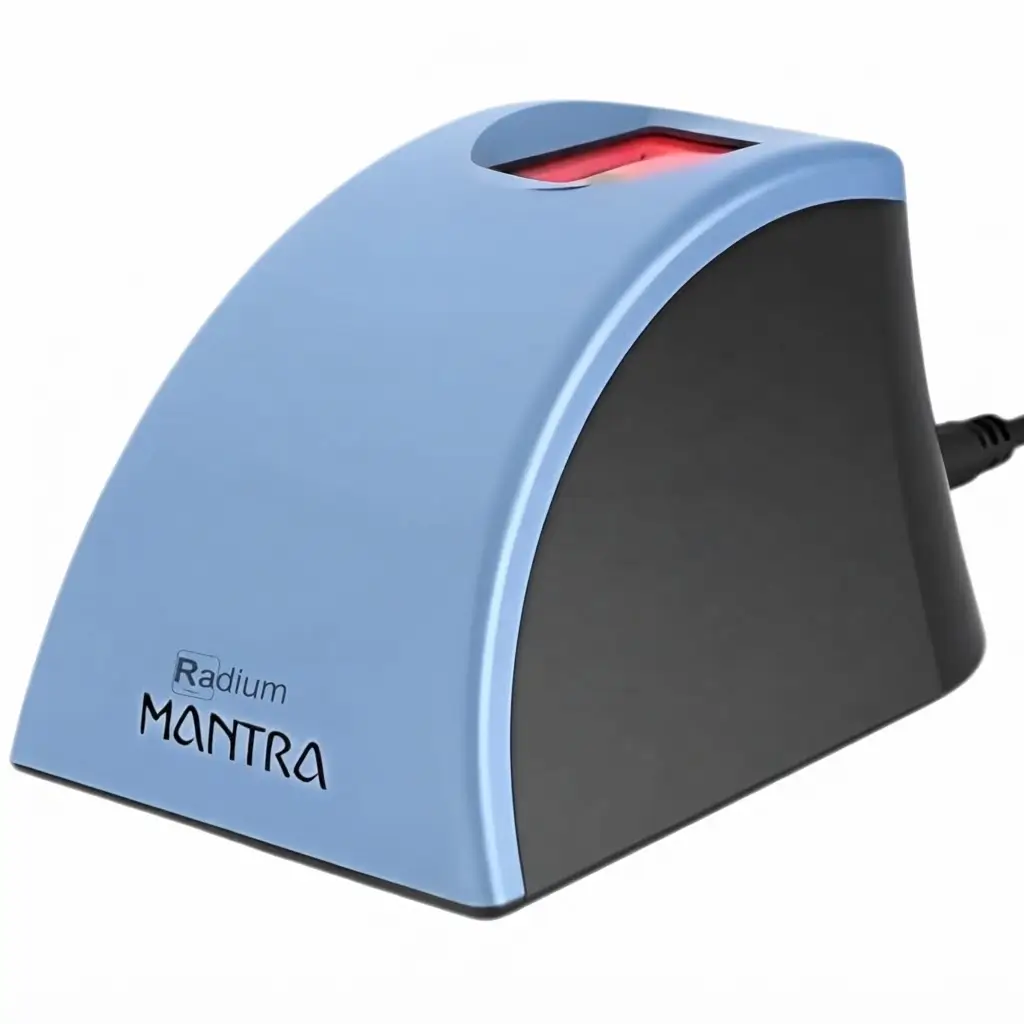
The Mantra MFS100 is an STQC-certified (L0) single-finger optical fingerprint scanner for Aadhaar-based counters in India: 500 DPI capture on a 16 by 18 mm platen, sub-second auto-capture, USB 2.0 bus power, and Registered Device (RD) service drivers for Windows, Linux and Android. A BC agent in a Bihar village holds an old farmer's thumb on the scanner while a queue of twenty watches, and the payment goes through in one touch.
That gap between a scanner that works in a city demo and one that works on cracked heels in May heat is exactly what this guide tests. The Mantra MFS100 suits AEPS, CSC, Jeevan Pramaan, PDS and eKYC counters where the scheme accepts L0. This guide explains who it suits, how a counter day runs on it, where L0 limits bite, and the mistakes that waste the spend.
Why Counters Fail at the Fingerprint Step
Ask any banking correspondent who has watched a customer walk away unpaid and you hear the same story. The scanner worked yesterday, the thumb looked the same, but today the device blinked red three times and the software timed out. The agent took the blame for a setup failure.
Field failure is rarely the sensor alone. It is usually one of four things: the wrong certification level for the scheme, missing RD service on the PC, a dry or worn thumb nobody prepped, or a cloned device that was cheap for a reason. This guide follows that order, with the MFS100's verified numbers written down.
What the MFS100 Actually Is
Strip the brochure and you get a single-finger optical reader that behaves like a counter appliance: place the finger, auto-detect fires, capture finishes under a second, and an ISO template reaches your AEPS, eKYC or attendance software. The 500 DPI sensor with 256 gray levels reads dry, moist and aged prints that defeat cheaper readers, and the scratch-resistant platen survives thousands of daily presses.
Certification is the tender gate. STQC certification plus CE, FCC, RoHS and BIS clears bank BC onboarding, CSC empanelment and government scheme procurement where uncertified readers die at file one. The Mantra brand page carries the positioning, the fingerprint range shows sibling devices, and the official Mantra site lists the current lineup and support downloads. Everything below tests those claims against real counters.
Four Questions to Answer Before You Buy
- Does your scheme demand L0 or L1: AEPS and most CSC work runs on L0, while newer UIDAI-mandated flows need L1 hardware?
- What hosts the scanner: a Windows counter PC, a Linux kiosk, or an Android phone over OTG with BC apps?
- Is RD service installed and registered: without it, Aadhaar transactions fail even with perfect fingerprints?
- Who supplies sealed stock: a bill with serial and warranty, or a marketplace listing with no after-sales?
The Parts That Decide the Purchase
The Mantra MFS100 earns its place on crowded counters through four working parts: sensor resolution, capture speed, RD discipline and bus-powered simplicity. Each one below carries a verified number plus a field habit that protects it.
1. Optical Sensor, 500 DPI and Scratch Resistance
Capture runs at 500 DPI across a 16 by 18 mm platen, producing a 280 by 360 pixel image with 256 gray levels, which matches what Aadhaar authentication expects. Red-LED optical sensing reads through light dust and moisture, and the scratch-resistant surface keeps working after years of steel-counter use.
Dry thumbs still need prep. A quick wipe with a damp cloth, or asking the customer to press thumb to forehead for skin oil, lifts match rates more than any driver update. Train counter staff on this before blaming hardware.
2. Auto-Capture Under One Second
Speed decides queue discipline. Auto finger detection fires capture without a button press, acquisition finishes in under a second, and the next customer steps up. Across a 200-transaction day, those saved seconds become a second lunch break.
Auto-capture removes operator skill from the equation. New staff become productive in an hour because the device handles timing instead of the training manual. Banks standardised on this behaviour for BC networks for exactly that reason.
3. RD Service and Template Standards
Registered Device service is the managed driver layer UIDAI requires for Aadhaar authentication. Mantra maintains RD packages for its scanners, and the MFS100 outputs ISO 19794-2, ISO 19794-4 and ANSI-378 templates with WSQ compression that scheme software accepts directly.
Counter reality check: install the RD package, complete device registration, then run five live Aadhaar transactions before opening day. PCs that worked with an older scanner fail here when a Windows update or a changed USB port breaks registration.
4. USB Bus Power and Android OTG
No adapter means one less failure point. The MFS100 runs on 5 volts from the USB bus at under 100 mA, with standby under 40 mA, so laptops, POS terminals and phones carry it through field camps. For L1-mandated flows, compare the MFS110 L1 scanner as the sibling option before standardising.
OTG on Android turns a phone into a micro-ATM. Use a quality OTG cable, grant the USB permission once, and keep the phone charged since the scanner draws bus power. Cheap cables cause the classic symptom of working on PC yet vanishing on phone.
How One Counter Day Runs on It
Morning starts with a two-minute ritual: plug the scanner into the same USB port as yesterday, watch RD status turn green, and run one test authentication on your own finger. Counters that skip this discover dead RD service at peak queue instead.
Through the day, thumbs follow a rhythm. Place, hold still for the auto-capture blink, lift on the beep. Worn prints get a second try with slightly shifted placement rather than harder pressure, because pressing harder flattens ridges and fails more. At closing, unplug the scanner into its pouch instead of leaving it on the counter overnight.
Weekly, wipe the platen with a dry microfiber cloth and check the RD registration after any Windows update. Monthly, reconcile failed-transaction counts against footfall: rising failures with steady queues point to a dirty platen or dying cable, not a dying device.
Who Gains the Most From It
Banking Correspondents and Micro-ATMs
AEPS cash withdrawal, balance enquiry and Aadhaar Pay run on single-finger match all day. The MFS100's bus power suits laptop-based BC kits, and OTG suits phone-based kits. Keep a spare cable in the bag, because cables die more often than scanners.
CSC and Citizen Service Counters
PAN, passport support, certificates and scheme enrolments need ISO templates that government portals accept. The MFS100 outputs those directly, and its form factor fits counters shared with printers and laminators. For high-footfall halls, see how to choose an attendance machine for queue-adjacent planning.
Pension, PDS and Health Verification
Jeevan Pramaan life certificates, ration distribution and Ayushman verification serve elderly users with the hardest prints. Patience plus thumb prep plus auto-capture wins here. For Aadhaar attendance terminals at offices, the SAB3000 guide covers the fixed-counter sibling.
MFS100 Against the Alternatives
| Option | What you get | Where it falls short | Best fit |
|---|---|---|---|
| MFS100 scanner | STQC L0, 500 DPI, sub-second capture, USB bus power | L0 only, needs RD install, single finger | AEPS, CSC, eKYC counters |
| MFS110 scanner | STQC plus UIDAI L1, 500 DPI, sub-2-sec capture | Higher price, same single finger | L1-mandated flows |
| Phone-only OTP auth | No hardware, instant start | SIM dependency, fraud-prone, scheme limits | Low-value informal use |
| Iris scanner | Touchless, works on worn prints | Costly, needs trained operator | Enrolment-grade capture |
Buy the MFS100 when your scheme accepts L0 and your counter needs proven throughput. Move to L1 hardware when the mandate letter names it. I would not sell the MFS100 to a tender that prints L1 in bold, because eligibility rejection wastes more than the price gap ever saves.
MFS100 Price in India
Pricing is quote-based and moves with stock, warranty terms and quantity. Three numbers decide the real cost: unit price with sealed-box warranty, replacement cost when a cable or device fails in year two, and downtime cost when a counter sits idle during a festival rush.
Below-market listings deserve suspicion. Refurbished or cloned units fail at RD registration or die within weeks, and the seller vanishes with them. A genuine bill with serial, manufacturer warranty and RD support beats a discount that buys a second purchase.
How Long One MFS100 Lasts on a Counter
Lifespan is presses plus cables, not years on a sticker. A busy AEPS counter crosses two hundred presses daily, which means the scratch-resistant platen earns its name within months while USB cables die first. Counters that stock two spare cables per device never close for a ten-rupee part.
Plan replacement around failure points in order: cables every year, cleaning discipline forever, and the device itself for years when both hold. A BC network ordering fifty units should hold five spares plus twenty cables, because festival-season downtime costs more than the spares shelf ever will.
L1 vs L0 Sensors: Which Level Your Work Needs
L0 means the host PC handles biometric matching through RD service, while L1 moves matching inside the device with liveness checks against silicone fakes. Newer UIDAI mandates push sensitive flows toward L1, which is why tenders increasingly print it in bold.
Counter owners should read their own letters. When the bank circular or scheme guideline names L0, the Mantra MFS100 stays compliant and economical. When the letter names L1, order the MFS110 instead of hoping an L0 device clears technical evaluation. Wrong-level hardware fails at paperwork, not at fingerprints.
RD Setup in Seven Steps
- Download the MFS100 driver plus RD package only from Mantra sources for your exact Windows, Linux or Android version.
- Plug the scanner into the USB port it will live on, then grant USB permission on Android or confirm detection on PC.
- Install the driver first and the RD service second, in that order, then restart the host.
- Open the RD test utility and complete registration until status shows active.
- Run five live Aadhaar test transactions across two different fingers before opening day.
- Record the RD version, registration date and USB port on a counter sticker for future debugging.
- Recheck registration after every Windows update, because updates break RD more often than hardware fails.
Mistakes That Waste the Spend
Changing USB ports daily. RD registration binds to the port path, so a new port means a new failure. Pick one port and label it.
Pressing harder on failures. Hard pressure flattens ridges and fails more. Shift placement slightly, prep the thumb, then retry once before switching fingers.
Skipping the morning test. One self-test authentication catches dead RD before the queue forms. Counters that skip it debug during peak hours instead.
Buying on price alone. Cloned units look identical and fail at registration. Verify serials, demand sealed boxes, and test RD before releasing payment. Book a site survey for multi-counter rollouts, let the installation team configure RD across PCs, and keep AMC cover for year-two continuity.
How to Read the Quotation
Compare quotes on the full stack: sealed MFS100 units with serials, spare USB and OTG cables, RD installation support, Windows plus Android compatibility confirmation, manufacturer warranty terms, dispatch timelines across your districts, and AMC from year two. Quantity discounts matter for BC networks ordering fifty-plus units.
Ask for a five-transaction live test on your own seeded fingers before the order, then request a quote through Get a Quote with counter count, host types and scheme names written down.
Bottom Line
Counter success rests on four legs: the right certification level, working RD service, thumb prep discipline and genuine stock. The Mantra MFS100 brings proven hardware for all four at L0 counters across India, but only setup discipline makes them stand together. Confirm your mandate level, install RD properly, prep every thumb, and buy sealed.
Tell us your counter count, host mix and scheme names for a unit plus support quote from verified specs. The MFS100 product page carries the full specification to share with your bank or procurement committee.
Want the short version of every guide like this?
Get practical buying tips, product comparisons and security advice — plus a free consultation when you're ready to compare options.
Related Products — Mantra MFS100 Fingerprint Scanner: A Practical Buying Guide for
Mantra MFS100 — India's benchmark STQC-certified (L0) optical fingerprint scanner with 500 DPI scratch-resistant sensor, fast USB 2.0 connectivity and multi-platform driver support for banking, eKYC, and citizen welfare schemes.
- Fingerprint Capacity1
- AuthFingerprint
- USB

MFS110 L1 Fingerprint Scanner
Mantra MFS110 — STQC/UIDAI-certified L1 fingerprint scanner with 500 DPI optical sensor, USB interface and compact form factor for Aadhaar eKYC, banking and government services.
- AuthFingerprint
- USB