Mantra MFS110 L1 Fingerprint Scanner: A Practical Buying Guide for…
MFS110 pairs STQC plus UIDAI L1 certification, 500 DPI optical capture and sub-2-second matching for Aadhaar eKYC, banking and telecom. L1 meaning, RD setup and mandate checklist.
Quick answer
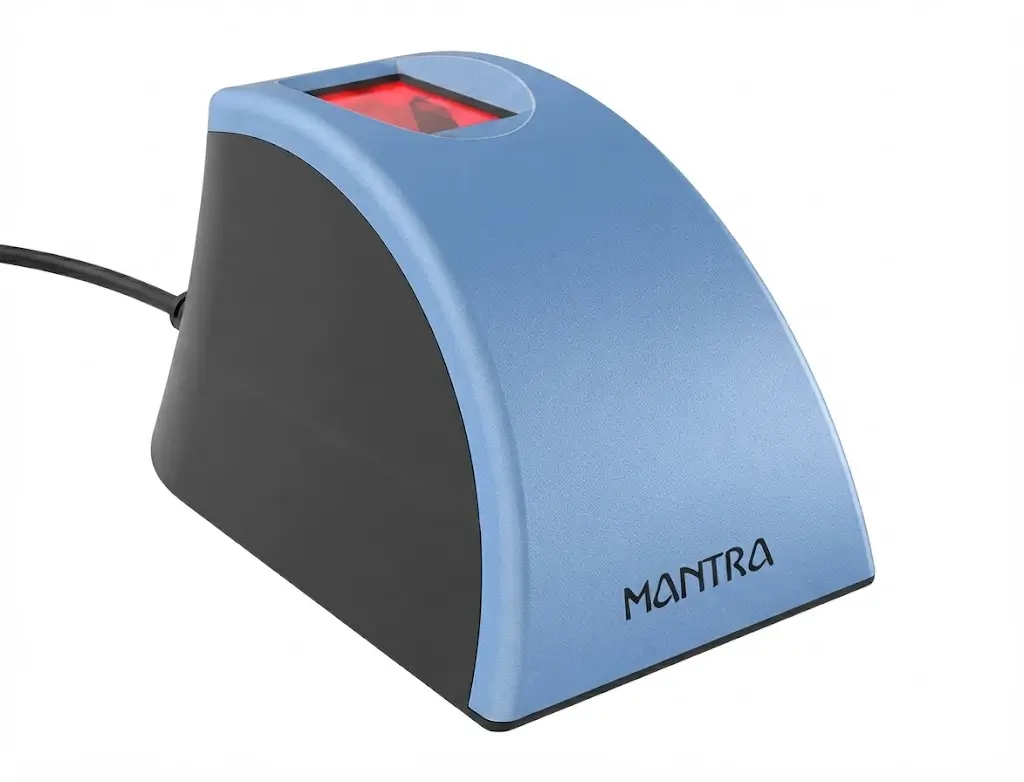
the MFS110 pairs L1 in-device matching with a 500 DPI optical sensor (16 by 19 mm platen, 276 by 336 pixel images), red LED illumination, acquisition under 2 seconds, ISO 19794-2 plus 19794-4 templates, USB connectivity, and a compact 91 by 61 by 54 mm body. MegaMind supplies sealed stock pan-India with manufacturer warranty and AMC.

Key takeaways
- MFS110 pairs STQC plus UIDAI L1 certification, 500 DPI optical capture and sub-2-second matching for Aadhaar eKYC, banking and telecom. L1 meaning, RD setup…
- Why Counters Fail at the Mandate Step
- What the MFS110 Actually Is
- Four Questions to Answer Before You Buy
- How One Rollout Day Runs on It
The Mantra MFS110 is an STQC plus UIDAI L1-certified single-finger optical fingerprint scanner for Aadhaar eKYC counters in India: 500 DPI capture on a 16 by 19 mm platen, acquisition under 2 seconds, USB plug-and-play, and SDK support for Windows, Linux and Android. An enrolment operator in Lucknow unboxes ten new devices for a bank KYC drive, and the L1 certificate copy decides whether the drive starts Monday or stalls in paperwork.
That gap between a scanner that matches fingerprints and one that satisfies a mandate letter is exactly what this guide tests. The Mantra MFS110 suits Aadhaar centres, bank onboarding, telecom SIM activation and government counters where tenders name L1. This guide explains what L1 changes, who must buy it, how rollout day runs, and the mistakes that waste the spend.
Why Counters Fail at the Mandate Step
Ask any vendor who has watched a bid die at technical evaluation and you hear the same story. The scanner matched beautifully in the demo, the price beat everyone, but the tender printed L1 and the device certificate said L0. The bid took the blame for a reading failure.
Mandate failure is never about image quality. It is about buying hardware against the wrong letter. Three questions settle it before any order: what certification level your circular names, whether your software stack supports the RD framework for it, and whether your supplier ships sealed stock with verifiable serials. This guide follows that order, with the MFS110's verified numbers written down.
What the MFS110 Actually Is
Strip the brochure and you get a single-finger optical reader with its matching brain inside the housing: place the finger, the device captures at 500 DPI under red LED light, matches within its L1 boundary, and hands an ISO template to your eKYC or KYC software in under two seconds. No host-side matching tricks, no liveness excuses.
Certification is the product here as much as the sensor. STQC plus UIDAI L1 clears Aadhaar centres, bank onboarding, telecom SIM activation and government service counters where L0 devices now fail eligibility. The Mantra brand page carries the positioning, the fingerprint range shows the L0 sibling, and the official Mantra site lists the current lineup and SDK downloads. Everything below tests those claims against real counters.
Four Questions to Answer Before You Buy
- Does your tender or circular name L1 explicitly: if yes, only L1 hardware qualifies, and price cannot fix eligibility?
- What hosts the scanner: Windows counter PCs, Linux kiosks, or Android phones over OTG with BC and KYC apps?
- Is RD service plus SDK integration planned: who installs, registers and tests before opening day?
- What volumes and timelines: ten desks this month or a thousand counters across districts this quarter?
The Parts That Decide the Purchase
The Mantra MFS110 earns its premium over L0 hardware through four working parts: L1 in-device matching, 500 DPI capture, sub-2-second acquisition and SDK-backed integration. Each one below carries a verified number plus a rollout habit that protects it.
1. L1 Certification and In-Device Matching
L1 moves biometric matching inside the scanner with liveness checks that reject silicone fakes, under UIDAI's registered-device framework. That is the whole price gap in one sentence: the device proves the finger is alive instead of asking the PC to trust it.
Tender language decides everything. When the circular prints L1, evaluation committees check certificates before touching devices. Keep the STQC plus UIDAI certificate copy stapled to your quotation file, because the buyer who asks for it late has already shortlisted someone else.
2. Optical Sensor, 500 DPI and Red LED
Capture runs at 500 DPI across a 16 by 19 mm platen, producing 276 by 336 pixel images, which matches what Aadhaar authentication expects. Red LED illumination keeps capture steady in dim back offices and evening field camps where tube lights flicker.
Worn prints still need prep. The same damp-cloth wipe and forehead-oil trick from L0 counters applies here, because optics obey skin, not certificates. Train operators on thumb prep before blaming any scanner.
3. Sub-2-Second Acquisition and Templates
Placement to template in under two seconds keeps queues moving at bank branches and telecom counters. Output follows ISO 19794-2 and ISO 19794-4, so eKYC, KYC and attendance software accept templates without conversion layers.
Speed compounds across a drive. A thousand-customer SIM re-verification camp saves hours when each capture finishes a second earlier. Multiply by operator wages and the L1 premium starts looking like a discount.
4. USB Plug-and-Play and SDK Support
USB connectivity with Windows, Linux and Android support plus SDK documentation lets integrators embed the MFS110 into banking, telecom and government software directly. For L0 counters that stay outside mandates, the MFS100 scanner remains the value sibling.
SDK access changes who buys. Software vendors standardise on documented devices because integration cost beats unit price across thousands of seats. Ask for the SDK version and sample code with your quotation, not after the order.
How One Rollout Day Runs on It
Morning starts with certificate verification: serials against the packing list, RD status green on each host, and one test eKYC on your own finger per desk. Drives that skip this discover dead registrations at peak footfall instead.
Through the day, operators follow a rhythm of place, hold, lift. Failed matches get a repositioned retry rather than harder pressure, and supervisors rotate operators every two hours because tired thumbs press badly. At closing, devices go into pouches, hosts log out, and the day's transaction counts reconcile against footfall registers.
Weekly, wipe platens with dry microfiber and recheck RD after any OS update. Monthly, compare failure rates across desks: a single desk failing more points to a dirty platen or dying cable, while all desks failing together points to a server or network change upstream.
Who Gains the Most From It
Aadhaar Centres and eKYC Desks
Enrolment updates, demographic corrections and authentication counters run L1 by mandate. The MFS110's certificate plus template standards fit these flows directly. For sibling attendance deployments see how to choose an attendance machine.
Banks, NBFCs and Insurance KYC
Account opening, loan disbursement and claim verification need audit-grade identity in minutes. The MFS110's sub-2-second capture and SDK support suit branch software stacks. Telecom SIM activation counters share the same logic at higher volumes.
Government Counters and Telecom Retail
Service delivery counters, pension verification and SIM re-verification camps process thousands daily. Compact 91 by 61 by 54 mm bodies fit crowded desks, and USB power removes adapter hunts. For Aadhaar attendance terminals at offices, the SAB3000 guide covers the fixed-counter sibling.
MFS110 Against the Alternatives
| Option | What you get | Where it falls short | Best fit |
|---|---|---|---|
| MFS110 scanner | STQC plus UIDAI L1, 500 DPI, sub-2-sec, SDK | Higher price than L0, single finger | Mandated eKYC, banking, telecom |
| MFS100 scanner | STQC L0, 500 DPI, sub-second, bus power | L0 only, fails L1 eligibility | Non-mandated AEPS, CSC counters |
| Phone-only OTP auth | No hardware, instant start | SIM dependency, fraud-prone, scheme limits | Low-value informal use |
| Iris scanner | Touchless, works on worn prints | Costly, needs trained operator | Enrolment-grade capture |
Buy the Mantra MFS110 when the mandate letter names L1 or your roadmap points there within the hardware's life. Stay on the MFS100 when L0 suffices and budgets bite. I would not sell L0 hardware into an L1 tender at any discount, because eligibility rejection costs the whole bid, not just the device margin.
MFS110 Price in India
Pricing is quote-based and moves with stock, warranty terms and quantity. Three numbers decide the real cost: unit price with sealed-box warranty, integration cost across your software seats, and rebid cost when wrong-level hardware loses a tender.
L1 hardware costs more than L0 for a real reason: in-device matching plus certification testing. Buyers who compare only unit prices miss the expensive line, which is a failed technical evaluation. Confirm the mandate level in writing before comparing any two quotes.
How Long One MFS110 Lasts on a Desk
Lifespan is transactions plus cables, not years on a sticker. A bank KYC desk crosses one hundred captures daily, which means the optical platen earns its keep within months while USB cables die first. Desks that stock a spare cable per reader never close for a ten-rupee part.
Plan replacement around failure points in order: cables every year, cleaning discipline forever, and the reader itself for years when both hold. A telecom circle ordering two hundred units should hold twenty spares plus fifty cables, because drive-week downtime costs more than the spares shelf ever will.
RD Setup in Seven Steps
- Download the MFS110 driver plus RD package only from Mantra sources for your exact Windows, Linux or Android version.
- Plug the scanner into the USB port it will live on, then grant USB permission on Android or confirm detection on PC.
- Install the driver first and the RD service second, in that order, then restart the host.
- Open the RD test utility and complete registration until status shows active.
- Run five live eKYC test transactions across two different fingers before opening day.
- Record the RD version, registration date and USB port on a desk sticker for future debugging.
- Recheck registration after every OS update, because updates break RD more often than hardware fails.
Mistakes That Waste the Spend
Ordering before reading the circular. L0 devices in L1 tenders die at paperwork. Match the certificate to the letter first, then compare prices.
Skipping SDK validation. Integrators who assume plug-and-play discover API gaps during rollout. Test your exact software build with the SDK sample before ordering hundreds.
Sharing one scanner across desks. RD registration binds to the host plus port path, so a floating device fails somewhere daily. Assign each MFS110 to one desk and label both ends.
Buying on price alone. Cloned units look identical and fail at registration. Verify serials, demand sealed boxes, and test RD before releasing payment. Book a site survey for multi-desk rollouts, let the installation team configure RD across hosts, and keep AMC cover for year-two continuity.
How to Read the Quotation
Compare quotes on the full stack: sealed MFS110 units with serials, certificate copies, spare USB and OTG cables, RD plus SDK integration support, OS compatibility confirmation, manufacturer warranty terms, dispatch timelines across districts, and AMC from year two. Quantity discounts matter for networks ordering hundreds.
Ask for a five-transaction live test on your own seeded fingers plus an SDK sample run before the order, then request a quote through Get a Quote with desk count, host types and mandate references written down.
Bottom Line
Mandate success rests on four legs: the right certification level, working RD service, operator discipline and genuine stock. The Mantra MFS110 brings proven L1 hardware for all four at eKYC and KYC counters across India, but only rollout discipline makes them stand together. Confirm L1 in writing, install RD properly, prep every thumb, and buy sealed.
Tell us your desk count, host mix and mandate references for a unit plus support quote from verified specs. The MFS110 product page carries the full specification to share with your bank or procurement committee.
Want the short version of every guide like this?
Get practical buying tips, product comparisons and security advice — plus a free consultation when you're ready to compare options.
Related Products — Mantra MFS110 L1 Fingerprint Scanner: A Practical Buying Guide
MFS110 L1 Fingerprint Scanner
Mantra MFS110 — STQC/UIDAI-certified L1 fingerprint scanner with 500 DPI optical sensor, USB interface and compact form factor for Aadhaar eKYC, banking and government services.
- AuthFingerprint
- USB

Mantra MFS100 — India's benchmark STQC-certified (L0) optical fingerprint scanner with 500 DPI scratch-resistant sensor, fast USB 2.0 connectivity and multi-platform driver support for banking, eKYC, and citizen welfare schemes.
- Fingerprint Capacity1
- AuthFingerprint
- USB