Mantra MFS500 Fingerprint Scanner: A Practical Buying Guide for India
MFS500 pairs FBI PIV plus FAP10 certified 500 DPI capture, NIST quality filtering and IP54 build for banking, enrolment and border use. Enterprise checklist inside.
Quick answer
the MFS500 pairs FBI PIV plus FAP10 certified image quality with a 500 DPI sensor (15 by 18 mm sensing area, 296 by 354 pixels), NIST-compliant auto quality checks, capture under 2 seconds, ISO plus ANSI plus WSQ 3.1 plus JPEG2000 output, IP54 housing, USB bus power at 85 mA, and WHQL drivers with SDK for Windows, Linux and Android. MegaMind supplies sealed stock pan-India with warranty and AMC.

Key takeaways
- MFS500 pairs FBI PIV plus FAP10 certified 500 DPI capture, NIST quality filtering and IP54 build for banking, enrolment and border use. Enterprise checklist…
- Why Enrolment Images Fail Months Later
- What the MFS500 Actually Is
- Four Questions to Answer Before You Buy
- How One Enrolment Day Runs on It
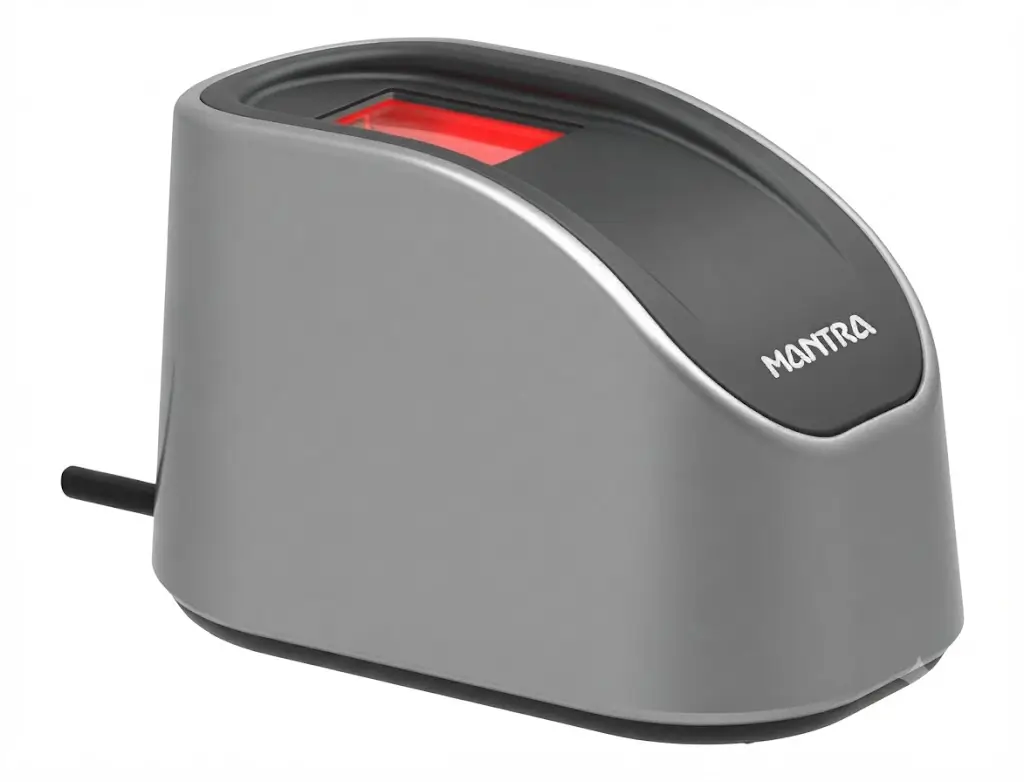
The Mantra MFS500 is an FBI PIV and Mobile-ID FAP10 certified optical fingerprint scanner for enrolment-grade capture in India: 500 DPI on a 15 by 18 mm area, NIST quality filtering, sub-2-second auto-capture and IP54 build. A field team in Rajasthan captures prints in a dusty community hall for a pension database, and six months later every record still matches on first try.
That gap between a scanner that looks sharp on screen and one whose images survive national-database matching is exactly what this guide tests. The Mantra MFS500 suits enrolment contractors, banking switches, border programs and tenders naming PIV or FAP10. This guide explains what those certifications change, who must buy this grade, how enrolment day runs, and the mistakes that waste the spend.
Why Enrolment Images Fail Months Later
Ask any database manager who has watched match rates decay and you hear the same story. Capture day looked fine, operators hit their targets, but a year later thousands of records need re-enrolment because minutiae were never really there. The project took the blame for a hardware-grade failure.
Late failure comes from buying counter-grade scanners for database-grade work. Four gates decide image survival: certified capture resolution, real-time quality filtering that rejects bad prints at capture, standards-compliant templates, and operators trained to recapture instead of override. This guide follows that order, with the MFS500's verified numbers written down.
What the MFS500 Actually Is
Strip the brochure and you get a precision optical reader that judges its own work: place the finger, auto-detection fires, NIST routines score the image, weak captures get rejected on the spot, and only quality prints become ISO templates in under two seconds. Red LED light keeps capture steady in dim halls and evening camps.
Certification is the product here. FBI PIV plus Mobile-ID FAP10 plus BIS IS 13252 plus CE plus FCC clears enrolment tenders, banking switches and border programs where uncertified readers die at file one. The Mantra brand page carries the positioning, the fingerprint range shows counter-grade siblings, and the official Mantra site lists the current lineup and SDK downloads. Everything below tests those claims against real fieldwork.
Four Questions to Answer Before You Buy
- Does your database demand enrolment-grade images: AFIS matching, national ID, or re-verification years later?
- Does your tender name FBI PIV, FAP10, or STQC levels: which certificate clears your technical bid?
- Where does capture happen: air-conditioned branches, dusty field halls, or border posts at noon?
- Who integrates the SDK: your team on Windows, Linux kiosks, or Android field apps?
The Parts That Decide the Purchase
The Mantra MFS500 earns its premium over counter scanners through four working parts: certified image quality, NIST filtering, rugged field build and SDK-backed integration. Each one below carries a verified number plus a field habit that protects it.
1. FBI PIV Plus FAP10 Certified Capture
FBI PIV certifies the image meets US federal identity capture quality, while Mobile-ID FAP10 certifies the finger acquisition profile for mobile enrolment. For Indian buyers the practical meaning is simpler: minutiae-grade images that AFIS, national databases and banking switches accept without rework.
Tender language decides budgets. When the bid names PIV or FAP10, evaluation committees check certificates before touching devices. Keep the certificate copies stapled to your quotation file, because the bidder who produces them late has already lost points.
2. 500 DPI Sensor With NIST Quality Filtering
Capture runs at 500 DPI, plus-minus 2 percent, across a 15 by 18 mm area, producing 296 by 354 pixel images with 256 gray levels. NIST-compliant routines then score each capture for contrast, ridge flow and usable area, rejecting weak prints while the subject still sits in front of you.
Filtering changes operator behaviour. Teams stop overriding bad captures because the device refuses them politely at capture time. Re-enrolment visits fall, and database match rates hold a year later when nobody remembers capture day.
3. IP54 Build and Field Power Discipline
An IP54-rated enclosure shrugs off dust and splashes across enrolment halls, border posts and branch renovations. Operation from 0 to 50 degrees covers Indian summers, while USB bus power at 85 mA with 40 mA standby runs off laptops and field batteries. For L0 counter work instead, the MFS100 scanner stays the value pick.
Rugged does not mean careless. Dust caps stay on between subjects, platens get wiped hourly in dusty halls, and kits carry padded cases because a cracked platen ends the day's targets. Weight at 123 grams keeps handheld use practical across long shifts.
4. Standards Output and SDK Support
Output follows ISO 19794-2, ISO 19794-4, ANSI-378, WSQ 3.1 and JPEG2000, so national databases and AFIS accept images directly. WHQL-certified drivers with a unique cryptographic serial per device simplify enterprise deployment, and SDK support covers Windows x86 plus x64, Linux and Android. For L1-mandated Aadhaar flows, compare the MFS110 L1 scanner as the sibling option.
Standards decide interoperability. Images captured today must match on systems bought tomorrow, so proprietary formats are a future re-enrolment bill. Ask for the SDK version and sample code with your quotation, not after the order.
How One Enrolment Day Runs on It
Morning starts with kit checks: platen clean, USB cables tested, SDK app version confirmed, and five test captures matched on the spot. Field teams that skip this discover dead cables after travelling forty kilometres instead.
Through the day, operators follow a rhythm of seat, wipe, place, verify. Subjects with worn prints get thumb prep plus repositioned retries, children get patience rather than pressure, and supervisors review rejected-capture counts hourly because rising rejections signal a dirty platen, not bad subjects. At closing, devices go into padded cases, counts reconcile against registers, and a sample batch gets matched before leaving site.
Weekly, deep-clean platens and audit cable stock because cables die faster than scanners. Monthly, track first-try match rates across teams: a falling trend with steady subjects points to aging cables or skipped cleaning, while a single team lagging points to training gaps.
Who Gains the Most From It
Enrolment Contractors and Citizen Databases
Civil registration, pension databases and welfare enrolments live or die on image survival years later. The MFS500's certified capture plus NIST filtering fits these programs directly. For attendance planning alongside, see how to choose an attendance machine.
Banks, Telecom and Insurance KYC
Account opening, SIM activation and claim verification need audit-grade identity in minutes at thousands of desks. Sub-2-second capture and SDK support suit these software stacks, and compact 85 by 51 by 54 mm bodies fit crowded counters.
Border, Police and Healthcare Verification
Immigration desks, law-enforcement checks and patient verification need reliable capture on difficult prints under pressure. IP54 build plus auto quality filtering covers what counter scanners cannot. For fixed Aadhaar attendance terminals, the SAB3000 guide covers the office sibling.
MFS500 Against the Alternatives
| Option | What you get | Where it falls short | Best fit |
|---|---|---|---|
| MFS500 scanner | FBI PIV plus FAP10, NIST filtering, IP54, SDK | Higher price, single finger | Enrolment, AFIS, border, tenders |
| MFS100 scanner | STQC L0, 500 DPI, sub-second, bus power | Counter grade, no PIV or FAP10 | AEPS, CSC counters |
| MFS110 scanner | STQC plus UIDAI L1, 500 DPI, SDK | L1 mandate focus, no PIV claim | Aadhaar eKYC, banking, telecom |
| Livescan ten-print | Slap plus rolled prints, FBI grade | Bulky, costly, trained operators | Criminal enrolment, visas |
Buy the Mantra MFS500 when images must survive database matching years later or the tender names PIV or FAP10. Stay on counter-grade hardware when same-day authentication is the whole job. I would not send L0 counter scanners to an AFIS-bound enrolment, because re-enrolment visits cost more than the hardware gap ever saves.
MFS500 Price in India
Pricing is quote-based and moves with stock, warranty terms and quantity. Three numbers decide the real cost: unit price with sealed-box warranty, SDK integration across your seats, and re-enrolment cost when weak images decay in the database.
Certification-grade hardware costs more for a tested reason: certified optics plus quality filtering plus standards output. Buyers who compare only unit prices miss the expensive line, which is a second field visit to every subject. Confirm the tender's certificate demands in writing before comparing quotes.
How Long Enrolment Images Stay Matchable
Database life is capture quality plus storage standards, not device age. Images captured at certified 500 DPI with NIST filtering match years later, while weak captures decay within months. Programs that pilot-match fifty subjects a week later predict database life before ordering hundreds.
Plan re-enrolment budgets around grade discipline: certified capture with standards output rarely needs revisits, while counter-grade images in AFIS databases guarantee second field visits. One pilot week beats one re-enrolment season every time.
Deployment in Seven Steps
- Confirm the tender's certificate list: PIV, FAP10, STQC level, or BIS, and match hardware to it in writing.
- Run a 50-subject pilot with your exact SDK build, then match every record a week later.
- Standardise one host OS plus SDK version across teams before ordering quantities.
- Kit each device with padded case, two spare cables, cleaning cloths and dust caps.
- Train operators on thumb prep, repositioned retries and rejection discipline, not overrides.
- Reconcile daily counts against registers and match a sample batch before leaving site.
- Track first-try match rates monthly, because falling trends flag cleaning or cable gaps early.
Mistakes That Waste the Spend
Buying counter grade for database work. Same-day matches prove nothing about year-later AFIS survival. Match the device grade to the database life first.
Overriding quality rejections. Operators who force bad captures create re-enrolment visits. Treat device rejections as free quality control, not obstacles.
Skipping the pilot match test. Datasheet lines never predict database life. A 50-subject pilot matched a week later predicts it directly.
Ignoring cable stock. Field cables die faster than scanners. Kits without spares lose days to a ten-rupee part. Book a site survey for multi-team rollouts, let the installation team standardise SDK builds, and keep AMC cover for year-two continuity.
How to Read the Quotation
Compare quotes on the full stack: sealed MFS500 units with serials, certificate copies, spare cables plus cases, SDK integration support, OS compatibility confirmation, manufacturer warranty terms, dispatch timelines across districts, and AMC from year two. Quantity discounts matter for programs ordering hundreds.
Ask for a pilot batch plus a week-later match report before the order, then request a quote through Get a Quote with team count, host types and tender references written down.
How Many Scanners One Program Needs
Throughput is teams times desks, not devices in a warehouse. One enrolment team with two operators needs two Mantra MFS500 units plus one spare per five teams, because a dead scanner without a spare ends the day's targets. A 50-team state rollout fields 100 daily and holds 10 spares for failures, cleaning swaps and court exhibits.
Run the maths for peak enrolment weeks, not average months. A pension camp processing 500 subjects daily per team needs capture plus match capacity for 500, with buffer for rejections and retries. Spares at 10 percent keep targets intact when dust, drops and cables strike.
Bottom Line
Database success rests on four legs: certified capture quality, real-time filtering, operator discipline and genuine stock. The Mantra MFS500 brings proven hardware for all four at enrolment and enterprise counters across India, but only field discipline makes them stand together. Confirm the certificate list, pilot before ordering, respect rejections, and buy sealed.
Tell us your team count, host mix and tender references for a unit plus support quote from verified specs. The MFS500 product page carries the full specification to share with your procurement committee.
Want the short version of every guide like this?
Get practical buying tips, product comparisons and security advice — plus a free consultation when you're ready to compare options.
Related Products — Mantra MFS500 Fingerprint Scanner: A Practical Buying Guide for
Mantra MFS500 — FBI PIV and Mobile-ID FAP10 certified optical fingerprint scanner with 500 DPI scratch-resistant platen, IP54 protection, WHQL drivers and USB 2.0 connectivity for enterprise and citizen identity authentication.
- Fingerprint Capacity1
- AuthFingerprint
- USB

Mantra MFS100 — India's benchmark STQC-certified (L0) optical fingerprint scanner with 500 DPI scratch-resistant sensor, fast USB 2.0 connectivity and multi-platform driver support for banking, eKYC, and citizen welfare schemes.
- Fingerprint Capacity1
- AuthFingerprint
- USB